

Tired of manual data entry? Learn how PropQwik empowers commercial real estate professionals to effortlessly transform any online CRE listing into a polished, client-ready PowerPoint presentation, saving valuable time and impressing clients.
How to Turn Any CRE Listing Into a Client‑Ready PowerPoint -The Complete Guide
Introduction: The New Era of CRE Presentations
Are you still spending valuable hours manually copy-pasting data and images from CRE listings? Imagine transforming any property listing into a client-ready PowerPoint in mere seconds. This speed isn't a pipe dream; it's the reality PropQwik offers to real estate professionals.
Traditional presentation creation for commercial real estate pros often feels tedious,
error-prone, and consumes too much time. This manual effort pulls you away from closing deals and
engaging clients. PropQwik changes this workflow. It is a Chrome and Edge extension designed to
turn CRE listing into presentation with unparalleled ease. This guide provides a complete
PropQwik guide to automating and perfecting your property presentations quickly.
The Manual Grind: Why Current Methods Fall Short for CRE Pros
Commercial real estate professionals face constant pressure. They must present new listings quickly, accurately, and professionally. The current manual process creates specific frustrations. Lost time ranks as the biggest challenge. Hours vanish while copying property details, financials, and photos. Formatting nightmares frequently follow, making a consistent look across presentations nearly impossible.
Inconsistent data and the risk of errors pose serious threats. A single mistake in a cap rate or
square footage can undermine a client's trust. Brokers struggle to keep up with new listings
because of this administrative burden. This manual workflow hinders productivity, professionalism,
and ultimately, deal closure rates. It forces pros to spend administrative time instead of
focusing on client engagement and deal-making. An efficient solution to
property listing to PPT is critical for a competitive advantage in today's fast-paced
market.
Introducing PropQwik: Your Presentation Powerhouse for Commercial Real Estate
PropQwik is a powerful Chrome and Edge extension built specifically for commercial real estate professionals. Its core function is simple yet revolutionary: it extracts structured data directly from CRE listing websites in one click. Think address, price, cap rate, broker contact, and crucial images—all captured instantly.
This tool offers several key benefits:
- One-Click Data Extraction: Grab all vital information with a single click.
- Automatic Image Capture: Secure all relevant property photos without manual saving.
- Background Extraction: Work on other tasks while PropQwik captures data in the background.
-
Effortless Presentation Creation: PropQwik directly helps you
turn CRE listing into presentationwith minimal effort.
PropQwik processes all data locally on your device. It stores no data on PropQwik's servers, ensuring your privacy. The extension also adheres to website Terms of Service, building trust for its users.
Step-by-Step: Turn Any CRE Listing into a Client-Ready PowerPoint with PropQwik
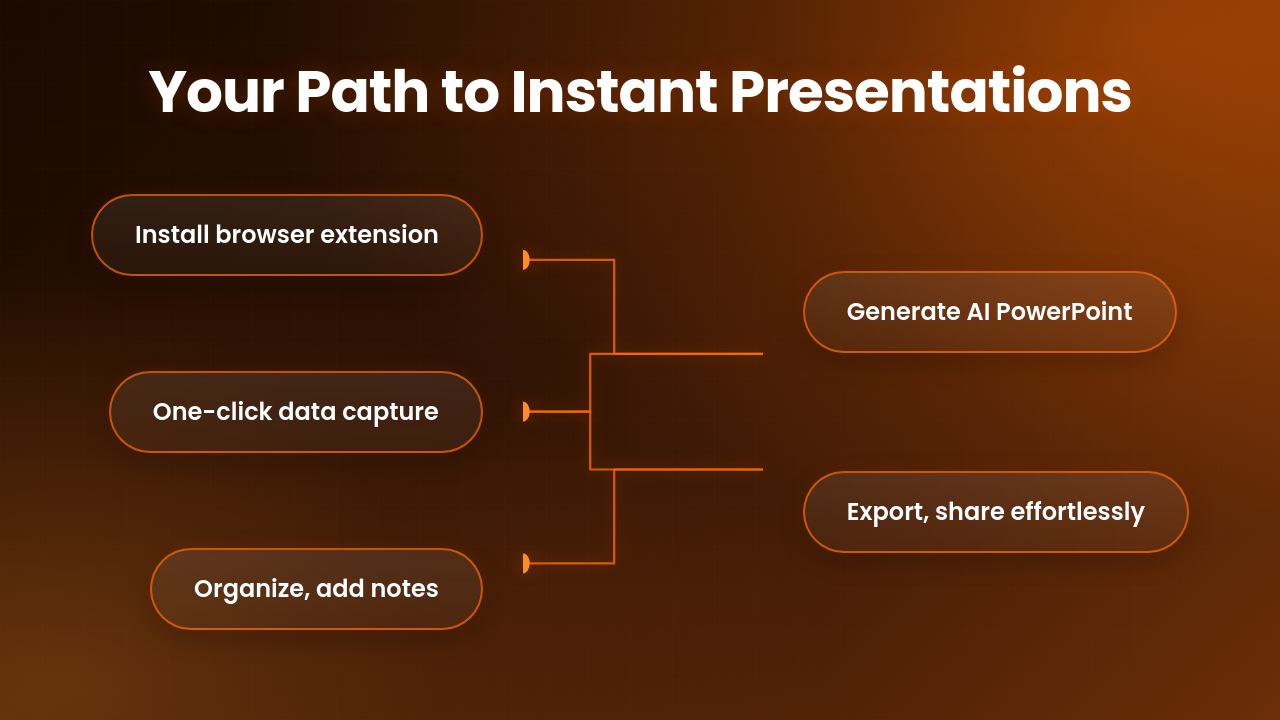
To turn CRE listing into presentation using PropQwik:
1. Install PropQwik: Your Chrome & Edge Companion
First, get PropQwik working on your browser. Visit the Chrome Web Store or Edge Add-ons store. Search for "PropQwik" and click "Add to Chrome" or "Add to Edge." A quick installation adds the extension to your browser. Remember, a 7-day free trial lets you explore all features before committing to a plan.
2. Navigate & Extract: The One-Click Wonder
Open your browser and go to a supported CRE listing page. PropQwik works seamlessly with popular platforms like LoopNet, and will soon support others like Crexi and CoStar. Once on a listing, activate the PropQwik extension icon in your browser toolbar. Watch it capture all key property data and images instantly. You can even switch tabs; PropQwik continues its automatic background extraction, saving you time.
3. Refine & Organize: Notes, Favorites, and Tracking
PropQwik offers an in-browser dashboard for all your extracted properties. Here, you can quickly review data for accuracy. Add personal property notes for reminders or client-specific details. Mark listings as favorites for easy access later. The dashboard also tracks all past extractions with search and filter capabilities. This feature ensures you stay organized and can quickly find any property.
4. Generate Your Masterpiece: Professional PowerPoint in Seconds
This is where PropQwik truly shines. Access the PowerPoint generation feature, powered by Gamma AI. You choose from various professional slide templates to match your brand. Select the properties you wish to include in your presentation. With a few clicks, PropQwik generates your property listing to PPT document. The result is a high-quality, professional presentation, ready for your clients, complete with branding opportunities.
5. Export & Share: Seamless Integration
Once generated, saving your new PowerPoint is simple. You can download it directly. For enhanced workflow, consider the Connectivity add-on, available for $10/month. This add-on enables automatic saving of your presentations to Google Drive. It also syncs structured data to Google Sheets. This integration makes sharing with clients and team members effortless, improving your overall data management.
Beyond the Basics: Maximizing PropQwik for Unrivaled Efficiency
Automated Sheets & Drive Sync: The Connectivity Add-on
The Connectivity add-on provides incredible value. It auto-syncs all extracted property data to Google Sheets. This creates a structured, centralized database of your listings. It also auto-saves all generated presentations to your Google Drive. This seamless integration means no more manual file management. You get a tidy, accessible record of all your property information and client proposals.
Team Collaboration & Custom Templates
Brokerage teams see significant benefits from PropQwik. Standardized templates ensure consistent, branded presentations across the entire organization. Every team member can produce high-quality, uniform materials quickly. This consistency elevates the team’s professional image and helps maintain brand standards. PropQwik fosters a more collaborative and efficient environment for everyone.
Prioritizing Your Privacy & Compliance
PropQwik holds user privacy as a top priority. It processes all data locally on your device. This means no data ever gets stored on PropQwik's servers. This local processing ensures your sensitive information remains private and secure. PropQwik also fully complies with website terms-of-service, operating ethically. This commitment to privacy and compliance builds significant trust with users.
Who Benefits Most? Gaining Your Edge in Commercial Real Estate
PropQwik delivers a clear advantage to various commercial real estate professionals. Commercial brokers gain speed in client response. Investment analysts can generate reports faster. Real estate developers quickly visualize potential acquisitions. Property managers easily create summaries for owners. Brokerage teams achieve consistent, professional output.
PropQwik allows these professionals to focus on high-value tasks. They can dedicate more time to closing deals, building client relationships, and performing market analysis. This shift frees them from tedious manual data entry. PropQwik enhances professionalism, speeds up response times, and ultimately helps users win more business. By delivering fast, polished presentations, you stand out in a competitive market.
Ready to Transform Your Workflow?
PropQwik provides immense benefits for creating commercial real estate presentations. It automates data extraction and generates professional PowerPoints with unmatched speed. Experience this transformation yourself. Start your 7-day free trial today. Visit the PropQwik website to begin your trial or explore our Starter ($19.99/month) and Pro ($39.99/month) plans.


Frequently Asked Questions (FAQs)
Q1: How does PropQwik ensure my data privacy?
A: PropQwik processes all data locally on your browser. It does not store any of your extracted information on its servers. This approach ensures your property details and client information remain completely private and secure on your device.
Q2: Can I use PropQwik on multiple CRE listing websites?
A: Yes, PropQwik currently supports popular CRE listing platforms like LoopNet. The development team actively works to expand compatibility to other major sites, including Crexi and CoStar, in future updates, giving you more flexibility.
Q3: What is the benefit of the Connectivity add-on?
A: The Connectivity add-on ($10/month) streamlines your workflow. It automatically syncs extracted data to Google Sheets for organized record-keeping. It also auto-saves your generated PowerPoints to Google Drive, making sharing and team collaboration much easier.
Q4: Does PropQwik offer different presentation templates?
A: Yes, PropQwik provides various professional slide templates. These templates allow you to choose a style that best fits your branding or client needs. You can create polished, customized presentations quickly and efficiently.
Q5: Is there a free trial for PropQwik?
A: Absolutely. PropQwik offers a 7-day free trial. This trial period allows you to fully explore all the features and experience how PropQwik can revolutionize your CRE presentation workflow before subscribing to a paid plan.
Q6: How does PropQwik help improve my efficiency as a CRE broker?
A: PropQwik eliminates the time-consuming manual process of data entry and formatting. It automates property data extraction and presentation creation. This automation allows you to focus more on client engagement, market analysis, and closing deals, boosting your overall productivity.
Q7: Can brokerage teams use PropQwik for consistent branding?
A: Yes, PropQwik greatly benefits brokerage teams. Its standardized templates ensure all team members produce presentations with a consistent look and feel. This consistency reinforces your team's brand identity and professional image across all client interactions.